
For Contractors Who Want Accurate Job Costing
QuickBooks Buildertrend Integration Done Right
Take control of job costs by syncing the tools you already use
The Risks of Incomplete Job Costing
➜ Budgets distorted by missing expenses
➜ Expenses that never get charged to a job
➜ QuickBooks reports that don’t match Buildertrend
➜ Undercharged jobs - Reduced profits
QuickBooks + Buildertrend Integration
Accurate Expenses = Accurate Budgets
Common Problems:
1. Incorrect QuickBooks + Buildertrend Integration
QuickBooks Online and Buildertrend not communicating properly.
2. Enter expense receipts in Buildertrend instead of QuickBooks
Many contractors have their team upload expense receipts directly into Buildertrend — but this often leads to inaccurate budgets.
Without verification, receipts often enter Buildertrend with inaccurate amounts or incomplete, and project budgets became unreliable.
Since Buildertrend doesn’t connect to a bank feed, there’s no way to confirm whether all receipts were actually entered or if any are missing. Over time, this causes distorted budgets and inaccurate job costs — and even worse, some expenses never get billed to the client.
Solutions:
1. Correct any QuickBooks + Buildertrend integration issues.
2. Enter your receipts in QuickBooks first — then let them flow into Buildertrend already matched to the right job.
With QuickBooks + Buildertrend integration working in sync, every expense lines up with your bank feed and shows up under the right cost code. No more missing receipts, no guessing, and no surprises in your budgets.
Real Example:
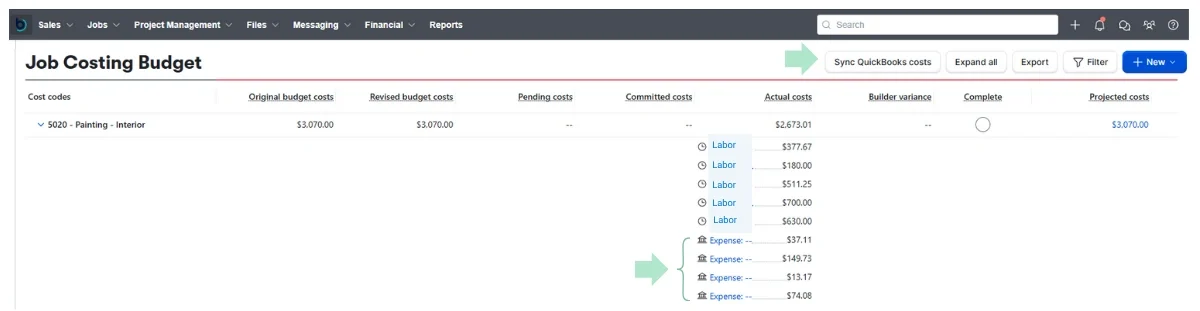
With a correct QuickBooks + Buildertrend integration, everything just clicks. Each expense you record in QuickBooks drops automatically straight into the right job and cost code in your Buildertrend budget—so your numbers stay clean and your jobs stay accurate.
The sync updates in real time, but you can also click “Sync QuickBooks Costs” anytime to manually refresh your connection. If the button doesn’t appear in your Job Costing Budget screen, your QuickBooks Online and Buildertrend accounts may not be fully connected..
Results:
Every expense captured in the right job
Real-time job profitability
No more chasing down mismatches
Smarter bids, stronger margins
Fair and transparent costs — contractors get paid what they’re owed, and clients are billed accurately
From Guessing to Knowing
Why Contractors Trust Job Costing
See which jobs are making money—instantly.
Invoice faster and stop chasing missing charges.
Make smart pricing and bidding decisions with confidence.
Know exactly where every hard-earned dollar went.
Catch cost overruns before they eat into profits.
Clarity that gives peace of mind - and confidence to grow.
Free QuickBooks + Buildertrend Integration Review
Here’s exactly what you’ll receive in your free review
Integration Checkup
Spot syncing gaps and connection issues between QuickBooks and Buildertrend.
Expense Flow Review
Confirm every job expense flows correctly from QuickBooks into Buildertrend.
Profitability Insights
Insights on where missed billables could be impacting your project profitability.
Video Call + Action Plan
1-hour video call with an action plan to fix issues and answer your questions.
Request Your Free QuickBooks + Buildertrend Integration Review – completed within 7 days
What to expect:
Submit your request – I’ll email instructions to invite me as your accountant in QuickBooks Online and create a Buildertrend access login.
Review completed within 7 days – I’ll check how QuickBooks and Buildertrend are syncing, confirm expenses are properly assigned to jobs, and identify any gaps or errors.
Actionable plan – You’ll get simple, clear steps to fix issues and keep both systems working together seamlessly.
👉 Prefer to talk first? Schedule a Free Consultation here.

Why work with me
I’m Rose Borges, founder of Driven Bookkeeping, certified QuickBooks ProAdvisor, and specialized in Project-Based | Job Costing. I thrive in helping general contractors with job costing and fine tunning their QuickBooks + Buildertrend integration.
I personally review every submission—no outsourcing, no bots.
Your data is secure and reviewed only by me.
Have questions? I’m just a message away—feel free to reach out anytime!
call/text: (858) 581-2945
Project-Based Costing Puts You Back in Control
Without clear job costing, profit slips through the cracks. Materials, labor, subs, change orders—if you can’t track it, you can’t control it. With project-based costing, you’ll finally see the true numbers behind every job so you can stop guessing and start growing.
Stop losing money on jobs you can’t track.
F.A.Q.
Common Questions Business Owners Ask
Simple explanation: tracking income/expenses by job.
For the Free QuickBooks + Buildertrend Integration Review, you do need to already be using Buildertrend since I’ll be reviewing the integration between the two systems. If you do not use Buildertrend, please request the Free Job Costing Review (QuickBooks Online Review) instead.
Yes, I collaborate with your tax professional.
That’s exactly what I’m here for. Each month, we’ll have a video check-in (30 or 45 minutes, depending on your plan), where I’ll walk you through your key financial reports like the profit and loss, balance sheet, and cash flow statement. I’ll explain what the numbers mean in plain English, so you always feel confident and informed—not overwhelmed. And if questions come up between calls, you can always reach out via email.
I’m a certified QuickBooks ProAdvisor and trained bookkeeper with over 15 years of experience working with small and medium-sized businesses. I also hold a Bachelor’s, MBA, and DBA in Business Administration. My goal is to make your finances clear, easy to understand, and manageable—so you always feel confident about your numbers.
👉 View My ProAdvisor Profile